The Sage 200 2026 R1 update has arrived!
Sage continues to evolve its software to meet changing business and industry needs, helping finance teams work more efficiently and get more value from their systems.
The previous 2025 R2 release introduced a range of new features and improvements, enhancing automation, providing stronger security and offering greater flexibility.
Read more: Sage 200 2025 R2: What’s new in the latest update
Now, the Sage 200 2026 R1 update is here, bringing further enhancements built around real user feedback. From AI-powered search to more streamlined sales order processing, this release focuses on simplifying everyday tasks and freeing up valuable time.
Read on to discover what’s new in Sage 200 2026 R1 and how these changes could help your business work smarter. The new features are available across Sage 200 Professional, Sage 200 Standard and Sage for Education.
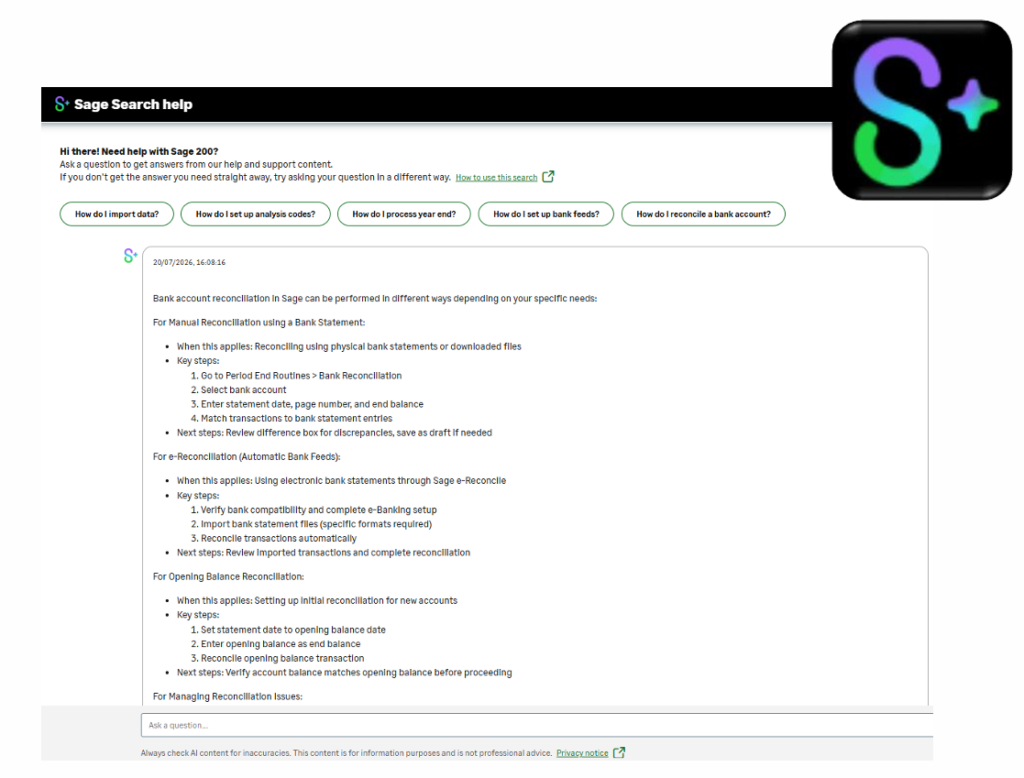
Sage Search Help: Find answers faster with trusted AI
Finance teams have enough on their to-do list without spending valuable time searching for answers to product or support questions.
Sage Search Help (Semantic Search) is an intelligent AI agent that can make finding information quicker and easier. It provides answers drawn from trusted Sage help and support resources, with links to relevant materials for further information.
Whether you have a simple “How do I?” question, need to understand a particular feature or want guidance on a specific task, you can ask natural language questions and find relevant guidance in an instant, without manually searching through multiple help pages and documents.
In practice, this means less manual effort and freed-up time to focus on higher-value work.
Bank Feeds: A smoother onboarding experience
The Sage 200 2026 R1 update improves the Bank Feeds onboarding journey, focusing on greater reliability and better error handling.
These improvements aim to make setting up Bank Feeds more straightforward with minimal friction, while clearer error handling helps users identify and resolve problems as and when they arise.
For finance teams, this means less time spent dealing with setup issues and more time focusing on managing day-to-day tasks.
Web screens on Sales Orders: Print, reprint and post directly from your browser
The Sage 200 2026 R1 update makes sales order processing quicker and easier to manage, allowing users to produce sales order documents directly from Sage 200 web screens, anytime, anywhere.
This covers the full print and post process, so you can:
- Print invoices and credit notes for sales orders and returns
- Reprint invoices and credit notes for sales orders and returns
- Post invoices and credit notes for sales orders and returns
- Print quotations.
For companies trading in multiple currencies, the update also offers greater flexibility in allowing exchange rates to be reviewed and amended on the print invoices screen.
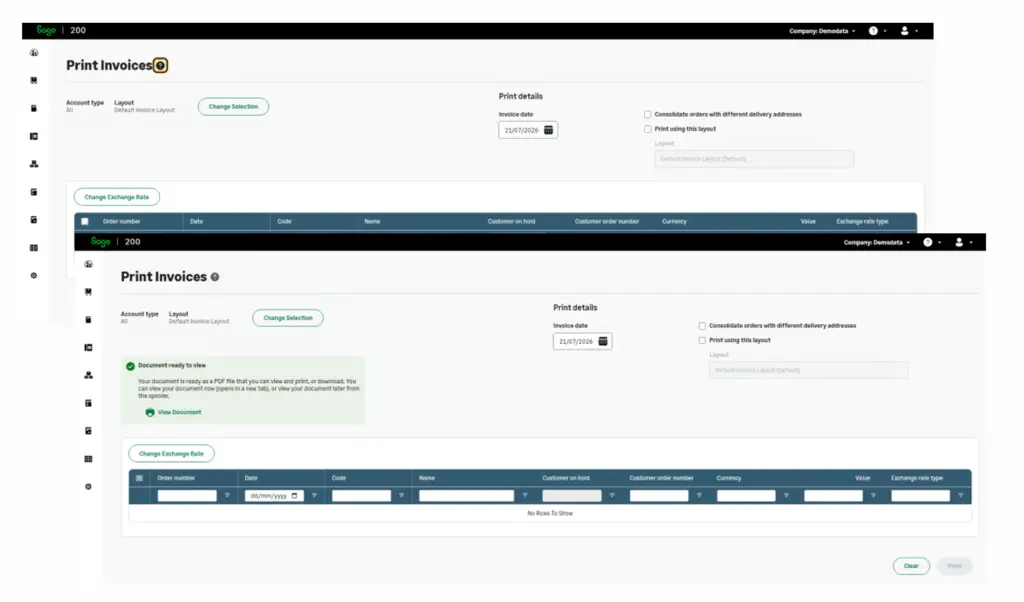
By bringing all of these capabilities together, Sage 200 makes it easier for finance teams to complete essential sales processing tasks, while reducing the need to switch between applications or follow extra steps.
Developer Enablement: API improvements for better integrations
For businesses looking to connect Sage 200 with other systems, the 2026 R1 update brings further improvements to API access, making more business data available through integrations and custom applications.
New read access (GET endpoints) has been introduced across eight modules:
- Sales Order Processing (SOP)
- Purchase Order Processing (POP)
- Nominal Ledger
- Sales Ledger
- Purchase Ledger
- Stock
- Fixed Assets
- Bill of Materials (BOM)
The Stock API has also been extended to support Create, Read, Update and Delete (CRUD) operations for additional endpoints covering:
- Internal Return
- Internal Issue
- Customer FOC Issue
- Write off stock
- Add stock
Greater API access makes it easier to integrate Sage 200 with external systems, automate business processes and develop custom applications tailored to your specific requirements.
Security and compliance: Keeping Sage 200 reliable
Alongside new functionality, Sage continues to invest in the security and maintenance of its software.
The Sage 200 2026 R1 update includes a range of improvements to support day-to-day operations and maintain the software in line with changing requirements.
These include:
Security enhancements
Defect resolution
Regulatory updates
Technical maintenance
Migration tool
From addressing reported issues to delivering necessary regulatory updates, these improvements help businesses continue using Sage 200 with confidence, knowing that security and compliance remain priorities.
Our Sage 200 experts are here to help you get the most out of the 2026 R1 update
The Sage 200 2026 R1 update focuses on practical improvements that make a real difference to everyday tasks. As with any update, the features most relevant to you will depend on how your organisation uses Sage 200, the workflows you rely on and any integrations you have in place.
At Solutions for Accounting, we help businesses get the most from their chosen software, ensuring it continues to meet their needs as they grow. Our Sage 200 experts can help you:
- Review your existing Sage 200 setup and customisations
- Plan and deliver your upgrade to Sage 200 2026 R1
- Train your team on the new features
- Ensure all integrations and extensions continue to work seamlessly
- Assess your business’s changing needs and identify when you might be outgrowing your current system.

Want to find out more about how the Sage 200 2026 R1 update could benefit your business? Please get in touch by calling 0115 840 5075 or emailing us at enquiries@solutionscloud.uk.